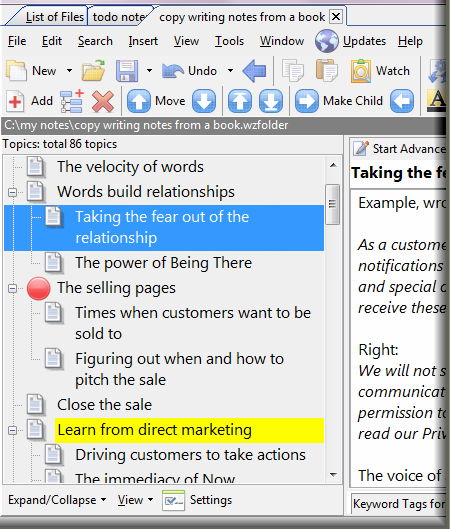
A Note Organizer and Outliner for Windows. Makes it easy to create, manage and cross-link your notes and ideas with drag & drop ease. Heavy-duty software. See all these power features for demanding users. Works on Windows Vista/XP/2000/98SE
A single document can keep thousands of notes and yet opens fast!
Convenient two-pane, list-editor document window
Full screen editor also available
Hierarchial list with duplicate note names possible
Rearrange or outline the list with drag and drop or by toolbar
Convenient button or keyboard alternatives for outlining
Join a bunch of notes to make a big document
Copy notes by drag and drop or clipboard
A note can have rich text
Uses Microsof Richedit for RTF compatibility
You can insert pictures, links and ole objects
Unique and powerful linking features you won't find elsewhere: You can insert wiki-like cross-links going to other notes, web sites and other files on your computer. What is more, the newer version gives you universal links back to WhizFolder notes from other applications like Microsoft Word. Boolean search for words with AND, OR, NEAR
Automatic paste feature to collect text from other applications
Flexible settings--vertical panes, multiple windows, and more
Nice tutorial to get started in minutes!
Simple interface, not clogged by features that you really don't need
Many more features: Export to RTF or HTML, Distribute notes with freeware viewer, Password protection (in paid version), and so on. For more details, see the tour, features, demos and FAQs. Great price with free updates for two years! The Deluxe Edition costs $80 and Pro Edition costs $39 only, both with free updates for 2 years. See compare editions.
"It is by far the most valuable software I have purchased in the
last two years, and I recommend it to all of my colleagues and students. It has become the center of
my work. It is elegantly straightforward and powerfully flexible. It does what it intends to do
without extraneous functions. I have explored other note-taking and PIM software, and I can find
none better."
"What I appreciate is your focus on notes. I'm so tired of programs that start out well-composed but then think that they must add more and more features to become 'multi-purpose' and end up clogging themselves with lots of junk that most users don't need or want. Notes are at the core of what most of us do, and a program that optimizes note-taking and management will always be of great value. And its ability to handle double-byte languages is a huge plus; many of my notes are in Japanese." Bill Kelly
Read more comments to know what the users are saying about this amazing software. Never lose another important tidbit of information again with WhizFolders. Download Today. WhizFolders is not a word processorMake no mistake about it. WhizFolders is not a word processor. Word processors are only for presenting your text, not for creating, collecting or researching it. WhizFolders is specially designed software to address all the problems you face when you sit down to write up new ideas for a first draft or to write your notes to learn new subjects or to make plans for a new venture.Does it look familiar or similar to some other software you have used?Look closely. Read the list of features in detail. You will discover a treasure trove of features specifically designed for one purpose--to let you manage your notes and ideas better.The idea that works in WhizFolders: The key to managing your notes well is to be able to briefly list them, in a hierarchy. You look at the content of a note only when you really need it. You won't find this powerful list metaphor in a word processor. Imagine loading a word processor document with 500 notes, just to add a brilliant idea that crossed your mind. The big document will take such a long time to load that you will forget what you wanted to add in the first place, leave alone the effort to find the proper place for the new note. This is very frustrating indeed! WhizFolders' powerful and fast-loading list of notes is the answer for all such problems. And this is no ordinary list!The "List of Notes" in WhizFolders uses a sophisticated Listing Technology made by a brilliant developer from Germany. We have worked for years to perfect the integration of this list with the document editor and hyperlinking features in WhizFolders. For example, in WhizFolders, you can select many notes and join them to make a big document for your word processor to do more sophisticated formatting. The list is heavy-duty too and can handle thousands of notes. A published author recently made a 1000-page reference book by printing to a pdf driver from WhizFolders.
How do you write your notes more effectively so that they are easier to review later?Here are some tips. WhizFolders is based on these principles and helps you write notes that are easier to review, brainstorm and comprehend later.
Use WhizFolders and satisfy your mind that always seeks better classification tools when dealing with new ideas
Not only can you do all of the above easily with simple drag and drop, button click features, you can also do a host of other things--use auto-pasting to collect information from the Internet and other documents, have links to open web sites and even other documents, export the notes to HTML to make a web page, export to RTF for use in your word processor, set up a document to automatically prefix note names with date and time to make your own diary or journal, distribute your notes to others with the freeware viewer utility, embed OLE objects like spreadsheets directly in your notes, and so on.
WhizFolders is so flexible that you can use it in hundreds of ways. Download a copy today and see your productivity soar.
|